
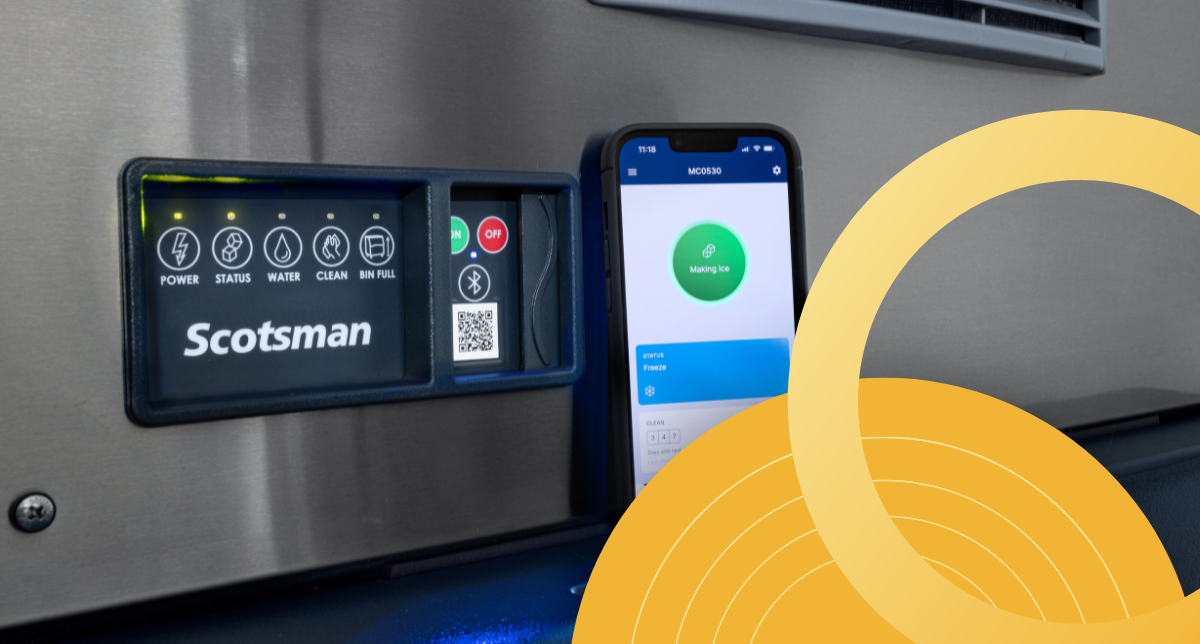
Smarter Features for Daily Ice Machine Use
Choosing a commercial ice machine is not just about daily ice production. Once the machine is installed, staff still need to check its status, clean it, respond to alerts, and keep up with routine maintenance.
Scotsman builds many of its commercial ice machines with features that make daily operation easier to understand. These features help staff see what the machine needs sooner and keep routine care on track.
Feature availability varies by model, so it is always important to review the specifications for the Scotsman ice machine you are considering.
Watch: Choosing the Right Scotsman Ice Machine
Before looking at specific Scotsman UX features, it helps to understand how ice type, production, storage, setup, and ease of use all work together when choosing a commercial ice machine.
Why UX Features Matter in Commercial Ice Machines
Commercial ice machines usually run in the background, but they still need regular attention. If staff do not know what the machine needs, small issues can be easy to miss.
A clear control interface, simple alerts, and easy access to machine information can make daily checks less confusing. That does not replace regular cleaning or professional service, but it can make the machine easier to manage.
Scotsman UX features can help staff:
- Check machine status
- Respond to alerts
- Find model-specific information
- Follow cleaning steps
- Keep up with maintenance
- Share better details when service is needed
Control Interface and AutoAlert Machine Visibility
On compatible models, the AutoAlert indicator panel gives staff a quick way to check machine status without opening the unit or searching through a manual.
Depending on the model, the panel can help show when the machine is operating normally, when the bin is full, or when the unit needs attention. That makes it easier for staff to spot changes during the day.
Why it helps:
A simple visual indicator gives staff a shared point of reference. In restaurants, bars, hotels, cafeterias, and other busy operations, that can make it easier to communicate when something needs to be checked.

ICELINQ App Connectivity
The ICELINQ app gives users another way to manage compatible Scotsman machines. Instead of relying only on the control panel, staff can use the app to view machine information from a mobile device.
With Bluetooth connectivity, compatible Scotsman machines can pair with the app for local access. Once connected, the app can help users check machine status, access settings, view active errors, use troubleshooting guidance, and follow guided cleaning support.
Why it helps:
If an alert appears, the app gives managers or maintenance staff another place to look before calling for service or digging through printed materials.
The app does not replace regular maintenance, but it can make maintenance easier to follow. For operations that rely on steady ice production, that added visibility can help staff respond with more confidence.

QR Code Access to Machine Information
Scotsman also uses QR code access on select machines to help users find important information faster. Instead of tracking down a manual or searching online for the right model, staff can scan the unit-specific QR code for machine-related resources.
Depending on the model, QR code access may help users find warranty information, app download links, service resources, manuals, cleaning guides, and other unit-specific details.
Why it helps:
Ice machines are often maintained by more than one person. A QR code gives staff a quicker way to find information for that specific machine, even if they do not know where the paperwork is stored.
Guided Cleaning and Maintenance Support
Cleaning is one of the most important parts of owning a commercial ice machine, but it is also one of the easiest tasks to delay. Busy staff may not always know when cleaning is needed, what steps to follow, or where to find the correct instructions.
On compatible Scotsman machines, app-based guided cleaning can make the process easier to follow. Instead of relying only on printed instructions, users can follow step-by-step support through the ICELINQ app.
Why it helps:
Guided cleaning makes routine maintenance more approachable for staff. It can also give managers a clearer way to train employees on proper cleaning procedures.
Scotsman machines still need regular cleaning, water filtration, and service when needed. Guided cleaning simply gives users another tool to help keep maintenance on track.
Watch: Scotsman Ice Machine Setup and Ownership Tips
Once a Scotsman ice machine is installed, setup, water quality, cleaning, monitoring, and routine maintenance all play a role in long-term performance. This video covers ownership habits that can help keep the machine easier to manage after delivery.
WaterSense and Upgraded Sensor Design
Water quality can have a major impact on ice machine performance. Minerals in the water can lead to scale buildup, which may affect cleaning needs, efficiency, and long-term operation.
On compatible Scotsman models, WaterSense Adaptive Purge helps manage water use during the ice-making process. It adjusts the purge cycle based on water conditions to help flush excess minerals from the system.
Some Scotsman models also include upgraded sensor designs that are easier to clean and built for durability. These updates can help reduce buildup around key sensing areas and make routine maintenance less complicated.
Why it helps:
A machine that is easier to keep clean is easier to own. WaterSense and improved sensor design support the maintenance side of the user experience, not just the ice-making process.
Preservation Mode for Added Uptime Support
Some Scotsman Prodigy ELITE models include Preservation Mode, a feature designed to support uptime when certain freeze or harvest issues occur.
If the machine detects a problem, Preservation Mode can allow the unit to keep making ice through a timer-based cycle until the issue can be cleaned or serviced. The machine can also notify users through the AutoAlert panel, controller display, and ICELINQ app.
Important note:
Preservation Mode does not mean the machine should be ignored. If it activates, the unit should still be cleaned or serviced as soon as possible.
Why it helps:
Staff receive clearer notice that something needs attention, and the machine may be able to continue producing ice temporarily instead of shutting down right away. For businesses that depend on steady ice availability, that added awareness can be valuable.
Front-Service Access and Placement-Friendly Design
Ease of use is not only about screens and alerts. Physical access matters too.
Many commercial kitchens have limited space around equipment. If a machine is difficult to reach, routine cleaning and service can become harder than they need to be.
Select Scotsman models are designed with service access and cleaning in mind. Depending on the machine, features may include front-located air filters, removable components, self-aligning panels, or easier access to serviceable areas.
Why it helps:
A front-located air filter is easier to notice, remove, clean, and reinstall. Removable components can make routine cleaning more manageable. Better access can also make it easier for service technicians to inspect the machine when maintenance is needed.
Before choosing a Scotsman ice machine, check the installation manual for clearance, airflow, utility, and service access requirements. A machine that fits the space properly will be easier to own after installation.

Optional Controls and Diagnostic Features
Some Scotsman machines also offer optional controls and diagnostic tools that give operators more flexibility.
Vari-Smart ice level control is available on select models and allows users to adjust ice levels based on demand. This can be helpful for operations with changing ice needs, seasonal traffic, or different service periods throughout the day.
Smart-Board advanced controls are another optional feature on select Scotsman models. These controls can provide additional operational data to support faster diagnosis and service.
Why it helps:
These features are not necessary for every operation, but they show how Scotsman approaches the ownership experience. The goal is not only to make ice. It is to give operators better information, better control, and easier ways to manage the machine over time.
Choosing a Scotsman Ice Machine That's Easier to Own
Scotsman UX features are built around a practical goal: making commercial ice machines easier to understand, clean, monitor, and maintain.
Features like AutoAlert, ICELINQ app connectivity, QR code access, guided cleaning, WaterSense, upgraded sensors, Preservation Mode, and front-service access can help reduce guesswork for staff. They also support better routine care, which is important for any business that depends on steady ice production.
The right Scotsman ice machine still depends on your ice type, production needs, storage requirements, available space, utilities, and maintenance routine. Once those basics are covered, user-friendly features can make a major difference in day-to-day ownership.
Ready to compare Scotsman ice machines?
Browse Burkett's Scotsman commercial ice machine collection or contact a Burkett sales representative for help finding a model that fits your space, production needs, and long-term maintenance goals


